
UnifyDrive UP6 in studio use - Honest review from the podcast production team
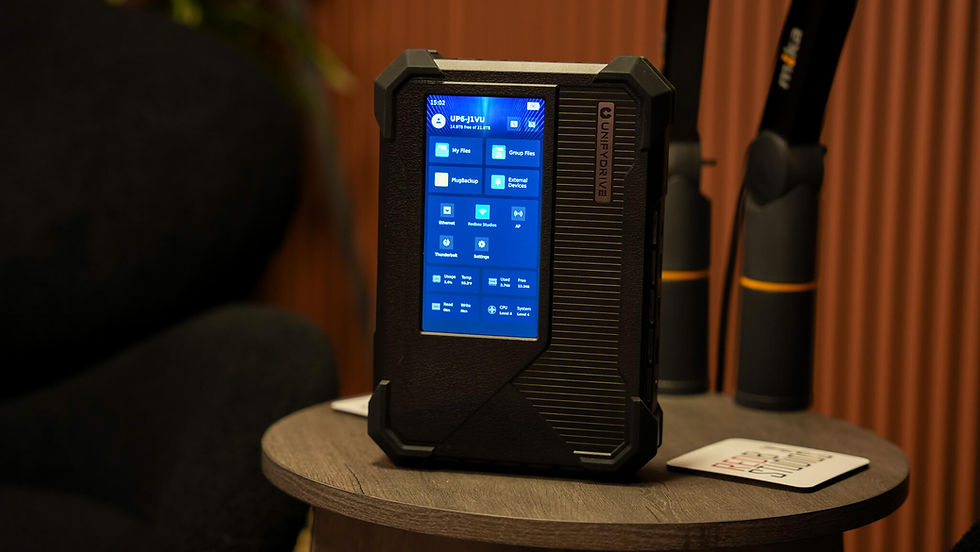
UnifyDrive UP6 Review: The best imperfect storage system for videographers
There were 20 external SSDs on my desk. LaCie, Samsung, all mixed up. Each one with a different project, a different client, a different date. Each with its own cable. Each one prompting the question: Which one had the footage from the Lacoste shoot on it again?
The UnifyDrive UP6 ended this chaos. Almost completely. Except for one Thunderbolt SSD, which I'm keeping for editing on the go, because it's simply more practical to plug a single SSD into the laptop when traveling than to carry an entire NAS system.
But "almost complete" is also an honest summary of this device. The hardware is excellent. The software still has some issues.
What is this thing?
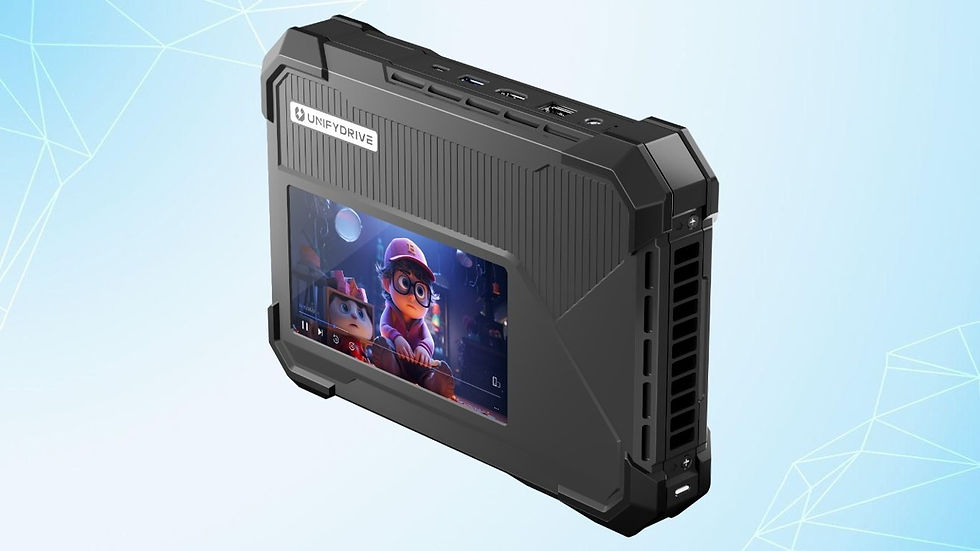
If you're not familiar with the UP6: It's a portable NAS with a built-in touchscreen, battery, and Intel Core Ultra 5 processor. It features six M.2 SSD slots, up to 48 TB of storage, Thunderbolt 4, 10 Gigabit Ethernet, Wi-Fi 6, and SD and CFexpress card slots. All in a chassis smaller than an iPad.
For a podcast and video studio, it solves a specific problem: Central storage that I can access at full speed via Thunderbolt, which also serves as a backup and from which I can directly read memory cards - without a laptop, without adapters, without detours.
The idea behind it is brilliant: an entire DIT cart in a single device that fits in a backpack. And in practice, it works—with limitations.

What works really well
The Thunderbolt 4 connection is fast. Really fast. When the UP6 is connected to the computer via Thunderbolt, I work directly from the NAS – DaVinci Resolve timeline with multicam footage, 8K R3D files, color correction. The transfer rates are high enough that the workflow feels no different than working from a local SSD.
Card backup without a computer. Insert the memory card, tap "PlugBackup" on the touchscreen, and you're done. After a day of shooting with three RED cameras, I insert the CFexpress cards one after the other, and everything is backed up without having to open my laptop. This saves 30 minutes at the end of a long day of shooting.
The consolidation. 20 SSDs become one device. Everything in one place, searchable, organized. No more "which drive was that on again?" That alone was worth it for me.
The casing feels high-quality. Metal, compact, solid. No cheap plastic feel, no rattling parts. It doesn't feel out of place in a bag with camera equipment.
Where the problems still lie
And now the points that nobody talks about in the sponsored reviews.
The Wi-Fi keeps disconnecting. Not after hours, but after minutes. The device regularly loses its Wi-Fi connection on its own and then has to be completely restarted to reconnect. For a device advertised as network storage, this is a fundamental problem. In my daily studio routine, where I want to access files via Wi-Fi without having to plug in a Thunderbolt cable every time, this is driving me crazy. It currently renders the Wi-Fi unusable for me.
The IP management is too simplistic. When you connect the UP6 via Thunderbolt, you get a new IP address. Every single time. There's no way to set a static IP for the Thunderbolt connection—or if there is, it's so well hidden that I couldn't find it. In practice, this means you have to check the current IP address and adjust it in your system every time. It sounds like a minor inconvenience, but it's annoying in everyday use when you just want to quickly access your equipment.
No file management without an app. The touchscreen interface shows you your files, you can view them, and start backups. But you can't copy, move, or organize anything. If I connect an external hard drive and want to transfer data to the UP6, I need the mobile app or the browser client. There's no copy function on the 6-inch touchscreen itself. For a device that advertises itself as "PC-free," that's a strange omission.
The backup always copies the entire card. If I insert a 2TB CFexpress card that still contains footage from the last shoot, the system copies everything. Not just the new files, not just selected folders – everything. With large cards where I intentionally keep older backups, this wastes time and storage space unnecessarily. A selective backup function – "copy only new files" or "copy only selected folders" – is completely missing.
Why I'm keeping it anyway
Because all four problems are software problems. None of them are a hardware limitation.
Wi-Fi disconnects? A firmware update can fix that. Static IPs for Thunderbolt? A setting in the next software version. File management on the touchscreen? A software feature. Selective backup? A checkbox in the backup function.
The UP6's hardware is in a league of its own compared to anything else I've used for file management. It's not comparable to an external SSD—that's like comparing a computer to a hard drive. And it's not comparable to a traditional NAS sitting in a cupboard, crawling along the network. The UP6 is portable, has full-speed Thunderbolt 4 direct access, built-in card readers, a battery, and enough processing power to theoretically serve as a full-fledged workstation.
This foundation is unique to this device on the market. The software just needs to catch up.
For whom does it already make sense?
If, like me, you run a studio and need centralized storage that you can access at full speed via Thunderbolt: Yes. The workflow via Thunderbolt is reliable and fast.
If you want to quickly back up your cards after a day of shooting without unpacking a laptop: Yes. Card backup works.
If you want to consolidate 20 SSDs into one device: Yes. That was my main reason, and it has been fulfilled.
If you primarily want to access the device via Wi-Fi: Wait. I wouldn't recommend using it for that purpose until the Wi-Fi problem is resolved.
If you want to manage files on the touchscreen without having a laptop or phone next to you: Wait. That functionality isn't available yet.
Conclusion
The UnifyDrive UP6 is the best piece of file management hardware I've ever used—packaged in software that's still unfinished. The hardware solves a real problem for anyone working with large amounts of data. The software gets in the way. Not in a way that renders the device unusable, but in a way that prevents it from being as good as it could be.
I'm keeping it. I use it every day. And I'm convinced the software problems will be resolved. But in its current state, it's a device for people who are willing to live with a few quirks – and who appreciate the underlying hardware.
20 fewer SSDs on my desk. That alone made it worthwhile.
Do you have questions about using the UP6 in the studio or about our data workflow? Write to us – we're happy to share our experience.


Comments